#
Change Requests
This feature is available only if it is activated in your license and if the Administrator has assigned the necessary access rights to you.
The Change Request feature has been added as an alternative way of modifying the database content in the Maintenance module. Instead of changing the data directly in the database, change requests can be created independent off the current data in the database and without affecting the operation of the system.
Change requests can be created for the following entries:
- components
- maintenance jobs
- job codes/job descriptions
- spare parts
A change request can be a request for:
- adding a new entry to the database
- changing an existing entry
- deleting an existing entry
The editing function for creating new entries and modifying existing entries are exactly the same functions you already use during the normal operation of the Maintenance module.
#
Difference between office and client version
- The functions for creating change requests are only available in ship/site versions of the software.
- The functions for creating change requests are not available in the office version. Please use here the standard edit functions.
- The functions for approving or rejecting change requests are only available in the office version.
The availability of the change request features is controlled via the user management. You may override the default user management settings and may make these features available wherever you want.
#
Creating a change request
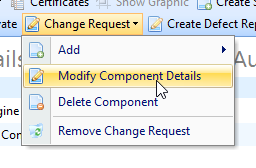
Where enabled, you'll find a menu Change Request that gives you access to the different change request creation options. For components, maintenance jobs and job codes, this feature can be found in the Components section of the Planned Maintenance module - the change request feature for spare parts can be found in the Stock section of the Planned Maintenance module.
#
Approving and rejecting change requests
Via the menu Reports > Change Requests you'll find all change requests that are still open to be approved or rejected.
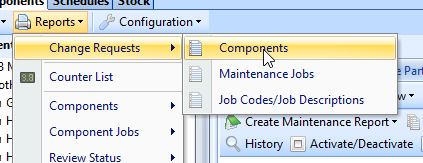
In the change request report window you find a section Add/Delete change requests and Modify change requests. An Add/Delete change request is always approved or rejected for the entire database record while the Modify section allows you to specify in detail, which of the requested changes are to be applied to the system.
Spare part change requests are to be managed in the Stock section of the Planned Maintenance module - also via the menu Reports > Change Requests.