Translation
While the native language of the ZeeBORN software is English, all or selected parts are also available in other languages.
In addition ZeeBORN can also provide the required tools for individually translate parts of the system.
Availability and Installation
The tools mentioned in this document are not part of the standard installation package and need to be requested from Support.
Limitations
The multi-language option is strictly limited to end user facing parts of the system. Other parts of the system like installation and configuration tools are not prepared for translation and will always be available in a English language version only.
Preparation
The following explanation uses the example of maintaining the Croatian language version of the ZeeBORN system.
- Copy all files from
translationfolder to a local disk folder. - Run
lmsetup.exefor installing the Language Manager. - Optional/Experimental: After installing the language manager you can replace the installed version of the Language Manager (langmngr.exe) with the version found in
translationfolder. This separate exe seems to be a newer version than the one installed via the setup. In addition to Google Translate it also supports Deepl translate. - Start
langmngr.exe - If you want to use Google Translate, use menu
Edit>Options> TabTranslation APIand enter the API key(s) for the translation service(s) you want to use.
Translation
- Open file
ZeeBORN.ntv.lngand choosecroationas the second language to be loaded. - Via the
Language > Showmenu you can choose what type of content is to be shown.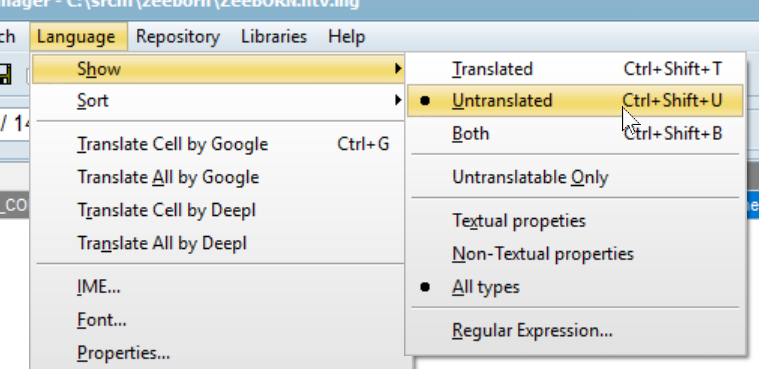
Reviewing existing translation
All translation currently available is done via Google Translate and may contain the usual translation errors.
There might be also strings, where Google couldn't find a matching translation. Those strings are marked in the lower right corner 
Text that can't be translated (or the Croation translation is identical to the original) should be marked as Is Translated 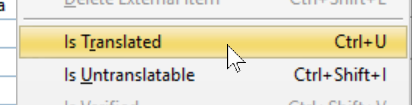 . Strings that shouldn't be translated (e.g. placeholder text, hidden default text of some UI elements) are already marked as
 Is Untranslatable. There is a chance that some string have not be properly marked during the initial review.
Typical strings to be marked as untranslatable are
- strings like
ID - strings with combinations like
ContactID,SiteName(those are usually identifiers used in the database and shouldn't be translated) - placeholder strings like
Label1,New Group,New Item - UI element identifiers like
lbName,cbOption(all strings that have a 2 or 3 letter prefix with lowercase letters)
Testing the Translation
After the translation is finished, it can be tested by creating the language files in the format expected by the ZeeBORN application. This preparation is also done with the Language Manager.
- Open the
ZeeBORN.exeviaFile>Select PE file ... - Select the column that contains the Croatian translation.
- Use menu
File>Create DLL.
This will create a language resource file with the name ZeeBORN.HRV in the same folder where the ZeeBORN.exe exists. You may need to grant write permission first for being able to create the file directly in the program files folder.
Deploying Translation Files
For deploying the translation files to another system, the following files must be copied to the same folder where the ZeeBORN.exe exists:
- ZeeBORN.ntv.lng (native language reference file)
- ZeeBORN.DEU.lng (example: German language reference file)
- ZeeBORN.HRV.lng (example: Croatian language reference file; HRV = ISO code for Croatian language)
- ZeeBORN.DEU (example: German language translated resources)
- ZeeBORN.HRV (example: Croation language translated resources)
Content to be reviewed/translated
This is only an example showing the modules to be reviewed and updated if the modules Site Management, Planned Maintenance and Documents & Checklists are to be translated.
ZeeBORN usually sets up a detailed translation project with more detailed instructions depending on the scope of system parts to be translated.
Forms
- fmAddAddress
- fmAddCategory
- fmAddCommunication
- fmAddImage
- fmAdministration
- fmAllJobs
- fmAppInit
- fmAppMainMenu
- fmArticle
- fmArticleBatchEdit
- fmArticleDetails
- fmArticleReport
- fmArticleSearch
- fmAssignContacts
- fmAssignDashboardItems
- fmAssignFolders
- fmAssignToComp
- fmAssignUseShips
- fmCatArticle
- fmCatArticleSearch
- fmChangePassword
- fmCommentAndReminder
- fmCompCertificate
- fmCompCopy
- fmCompCounterAdjust
- fmCompCounterReset
- fmCompDetails
- fmCompDuplicate
- fmCompJobsReport
- fmCompSearch
- fmCompSync
- fmCopyComponent
- fmCopyLocations
- fmCounterHistory
- fmCounterList
- fmCreateReportEx
- fmDefectReport
- fmDocConfig
- fmDocDetails
- fmDocDiff
- fmDocFolderImport
- fmDocLinks
- fmDocMain
- fmDocReport
- fmDocSearch
- fmDocSort
- fmDocTemplate
- fmDocTransfer
- fmDocViewer
- fmEditContact
- fmFindContact
- fmGetCatalogArticles
- fmGetComponent
- fmGetComponentJob
- fmGetComponentParts
- fmGetDate
- fmGetJobCode
- fmGetLocation
- fmGetSparePart
- fmGetStockParts
- fmJob
- fmJobCode
- fmJobCodes
- fmJobIntervals
- fmJobNames
- fmJobReport
- fmJobsDue
- fmJobSequence
- fmJobTemplates
- fmLoadGridSettings
- fmLocationDetails
- fmMain
- fmMaintMain
- fmMaintReportsLoadPeriod
- fmManageCatalogGroups
- fmMiniHTML
- fmNewRole
- fmRejectReport
- fmResponsibilities
- fmResponsibility
- fmResponsibilityJobs
- fmResponsiblePerson
- fmSaveGridSettings
- fmScheduleDetails
- fmSearchArticle
- fmSearchCertificate
- fmSelectCertificate
- fmSelectCertificates
- fmSelectJobCode
- fmSelectSpareParts
- fmShipCertificates
- fmSimpleHTMLEditor
- fmSiteManagerSites
- fmSiteManagerUserActivities
- fmSMAddShip
- fmSMShipCertific
- fmSMMainMenu
- fmSMSelectCertificate
- fmStock
- fmStockBatchEdit
- fmStockBatchMove
- fmStockCorrection
- fmStockDistribute
- fmStockImportCatalogXLS
- fmStockReset
- fmUpdateJobCodes
- fmUserMain
- LoginDialog
Units
- GlobalConstants
- hteditcontext
- HtmlCreator
- LicTools
- Maintenance
- Shared
- SiteManagement
- Stock
- UserManagement
- UserTools
- ZeeBORN