Create Dummy Reports
If a vessel is taken over from another owner/operator without any info about maintenance history, the CreateDummyReports.exe tool can be used for creating a clean cut in maintenance history by setting the database into a state that lets the Planned Maintenance module assume that all maintenance jobs to be done in the past have been executed as planned.
Preparation
Before the tool can be used, the following tasks must be completed:
Update Essential Component Data
- Set the start date for the vessel.
- Enter the current counter values via counter list (see Counter List)
- Update the maintenance job due dates by recalculating the job schedules (see Maintenance Job Schedules)
Based on the start date of the vessels, current component counters and known job intervals, the last due date for each job will be calculated. Depending on the interval size the resulting due date can be in the past but also in the future (like jobs to be done only each 90,000 hrs)
Tool Installation
As the tool is not part of the standard ZeeBORN software installation, the tool must be downloaded at https://downloads.zeeborn.net/CreateDummyReports.zip. The zip archive needs to be extracted to folder C:\Program Files (x86)\ZeeBORN\bin (or the folder used for the initial installation of the ZeeBORN software).
Creating Dummy Reports
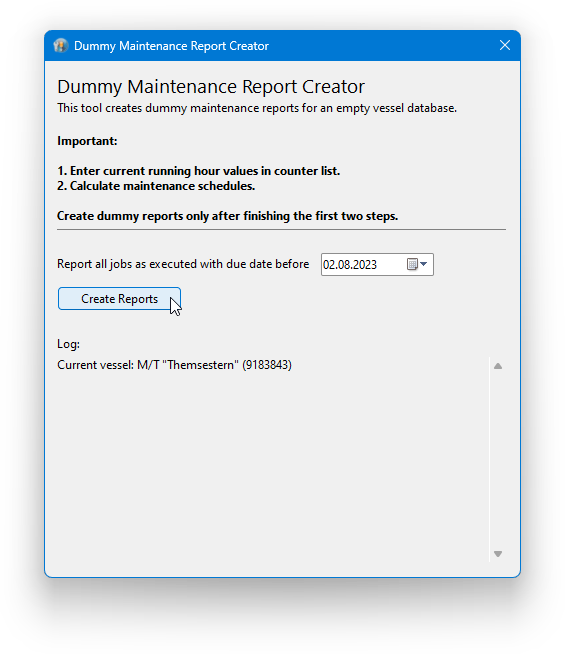
- After starting the
CreateDummyReports.exeyou will need to choose a reference date (by default the current date). All maintenance jobs having a due date before the selected reference date will be internally reported as done. - Click the button
Create Reportsfor creating the necessary data the let the system assume that all maintenance jobs have been executed as planned. This task usually takes only a few seconds. - After closing the tool, start the ZeeBORN software and recalculate the maintenance schedules list for receiving the next correct due dates.
Limitations
- This tool can't be used in the office.
- This tool can be used only for jobs that have been never reported as executed before.