Multilanguage Support
If requested by customer, the ZeeBORN main application can be made available with a user interface with multi-language support.
If this feature is enabled, the upper left corner of the application window contains an additional menu that allows the selection of one of the available user interface languages.
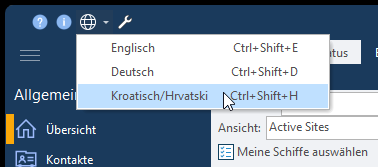
After changing the current user language a restart of the application is required for applying the requested change to the user interface. The system will offer to restart directly after the change. If you still have open documents or tasks, you can decide to restart later.
Limitations
Translation of the user interface is available only for user facing parts of the system. Administration tools (installation/updates, configuration and data replication tools) do not provide user interface translation.
Providing feedback
If you find errors in the translation, please send related change requests to support@zeeborn.net. Customers with extended support contract can access translation data directly via the ZeeBORN translation portal at https://weblate.zeeborn.cloud. Translations provided via the portal will be automatically included in the next ZeeBORN update.