Charter Party
In this module all charter contracts are recorded along with the associated data.
View
Folder "planned/contracted"
All recorded contracts are located in this folder.
Folder "ongoing"
This folder contains all active contracts.
Folder "closed"
Once the contract is completed and all data has been entered, the contract is moved to the closed folder.
General
You can create a new contract by selecting New -> then Vessel. The first Tab requests general information and adds attachments that directly apply to the charter party, such as the contract.
Delivery
Expected Delivery data will be filled out. Lashing and Bunker information will be added when charter starts.
Redelivery
Expected Redelivery data will be filled out. Lashing and Bunker information will be added when charter ends.
Bunker values at delivery and redelivery
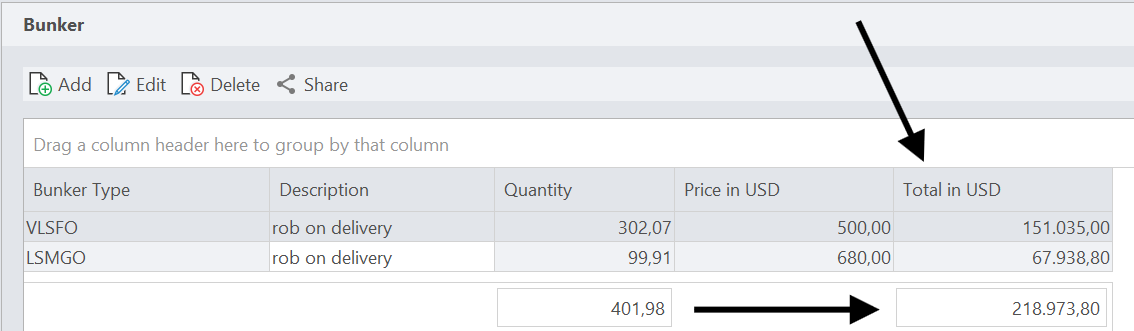
The bunker tables of Delivery and Redelivery show the value of each line, not only the price per tonne:
- the column Total in USD per line - quantity multiplied by price,
- a grand total in the footer row, summing up both the quantities and the values across all lines.
This gives you the actual total value of the bunkers at delivery and at redelivery directly.
Closing a charter
Closing a charter is separate from entering the redelivery date, so you stay in control of when a charter counts as closed:
-
When you enter the Actual Redelivery date, you are asked whether the charter should be closed right away. You decide at that moment whether the status is set to closed.
-
Independently of that, the Close Charter button closes a charter at any time - without having to enter a redelivery date first.
A closed charter moves to the folder closed.
The charter contract as a vessel document
The time charter contract can also be attached to the vessel itself, which puts a TC button on the vessel overview card for reopening it with one click. This is described under Details in the Site Manager.
Note the difference: attachments on the first tab of a charter (see General above) belong to that one charter contract, while the Time Charter document on the vessel belongs to the vessel and is reachable from its overview card.