View
Selection of displayed reports
In Office you can select which sites will be shown. On board the vessel is already selected.
More Action
Refresh
(see Refresh)
Search
(see Search)
Show inactive sites only
info
Office only.
Normally only active vessels appear in the tree. With this switched on it shows the reports of the inactive ones instead — useful when looking something up for a vessel that has left the fleet.
Legend
All icons for the status of a process will be shown with the related information.
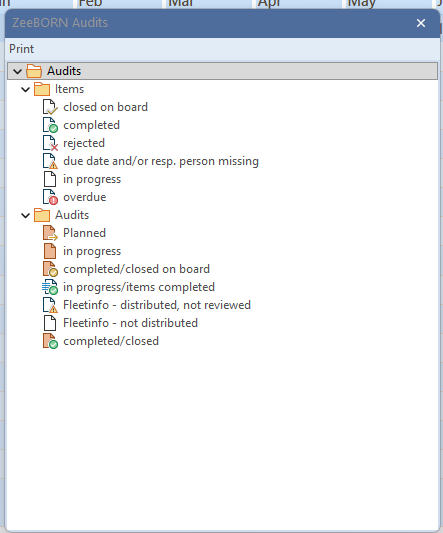
Items
- closed on board
- completed
- rejected
- due date and or resp. person missing
- in process
- overdue
Audits
- In progress
- Completed/closed on board
- In progress/items completed
- Fleet info-distributed, not reviewed
- Fleet info-not distributed
- Completed/closed
Admin
Check Audit Status
With this function the status of reports will be checked and if needed corrected.
Check Reviewing Status
With this function the reviewing status of reports will be checked and if needed corrected.
Update Audit Status (completely closed)
With this function the completely closed status of reports will be checked and if needed corrected.
Admin functions, visible only with an administrator login
These six change existing data rather than just displaying it. Each asks for confirmation first, and each works across all reports — not only the one selected.
Warning
There is no undo. On a large database these run for a while; let them finish.
Port to PortID
Older reports hold the port as free text. This converts those entries into references to the port list, so that reports can be evaluated by port. Ports that cannot be matched to an entry in the list are collected and shown afterwards — those have to be sorted out by hand.
Remove inactive distributing sites (not distributed)
Cleans up the distribution lists: it removes entries for vessels that are no longer active and where the report never actually reached them — either it was not distributed at all, or it was distributed but never reviewed and a review due date is set. Distributions that were properly completed stay untouched.
Copy Item Number Description to full description
Item numbers used to hold their description in a field limited to 256 characters. Where a description is longer than that and the newer full description field is still empty, this copies it across. Item numbers that already have a full description are left alone.
Import Sire Catalog
Reads the SIRE question catalog in from a spreadsheet — this is the set of questions, not an inspection result.
Import SIRE
Reads a completed SIRE inspection report in from an XML file. Ask for the audit type and the closing date before importing.
Import MoU Standard
Reads the MoU standard in.
Select my Ships
(see Select-my-ships)
Reminder
(see Comments & Reminder)
User Dashboard
(see User Dashboard)
Tree of reports
Depending on configuration the look of the tree can be different. But the tree in the 4 areas will be the same. Tree can be shown by report types or by report type groups. The folder “Final Verification, “Fleet Info” and “Closed” will be shown in each tree, when reports are included in the folder.
HTML View
Tab “HTML”
Depending on where the cursor is, all reports, all reports in a group or a single report are displayed.
Tab “Overview”
The “Overview” Tab is only visible when you are on the module name in the tree.